Built by a training provider, for training providers
Your replays belong to you. Plug them in wherever you want.
Your video sessions, recorded and summarized automatically. You connect your tools, embed video on your own site, and get your replays back.
No credit card. Free plan included.
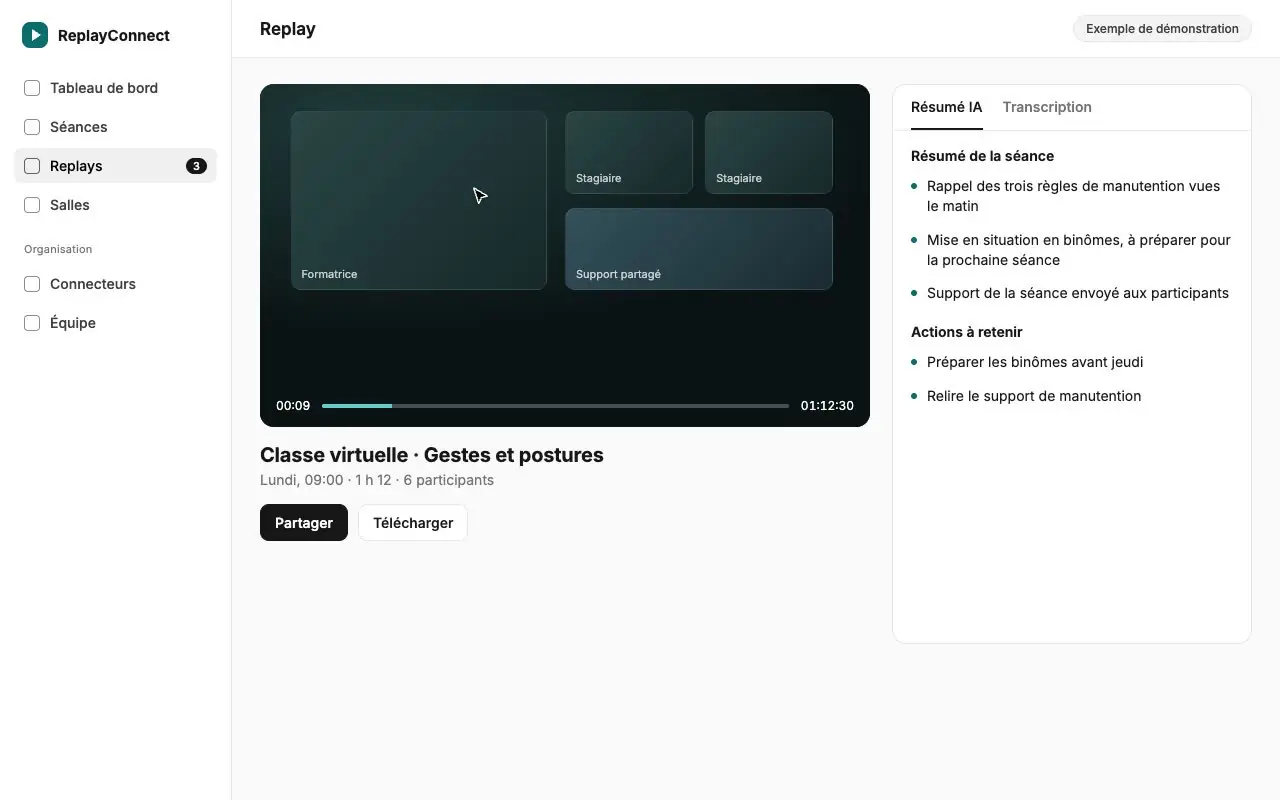
Virtual classroom · Safe lifting
Demo exampleTranscript
- 00:02 · Trainer
Let us go back over the three handling rules from this morning. - 00:14 · Learner
Keep your back straight, and bend your knees to lift. - 00:31 · Trainer
Exactly. Now let us move on to the pair exercise.
AI summary
- Reminder of the three handling rules
- Pair exercise to prepare for the next session
- Session handout sent to participants
What is ReplayConnect?
ReplayConnect is web software that records video sessions for training providers. A bot joins the scheduled session and records it. The replay and an AI summary are sent to participants, who do not need an account. ReplayConnect connects to SmartOF, Google Calendar, a REST API, webhooks and an iframe player for LMS. See the integrations. ReplayConnect is published by ILLITH, a training provider based in Bordeaux, and free up to 2 recorded session hours per month. For audits, Qualiopi evidence for virtual classrooms is covered separately.
- 4 plans, billed by recorded session hours: 2 hrs (Free), 10 hrs (Solo, €49 per month excl. VAT), 40 hrs (Team, €149 per month excl. VAT), 120 hrs (Organization, €349 per month excl. VAT). Prices as shown on replayconnect.fr/en/pricing, updated 22 October 2026.
- 0 accounts to create for the learner: they open the replay from the personal link received by email.
- Only 1 webhook today: recording.ready, sent when the replay is ready.
Recording a session should not cost you an evening
Your replays stay with the vendor
You pay a subscription to record, and the day you stop, your sessions are no longer yours. Here, your replays come out through the API, a webhook or an iframe.
Your evidence is assembled by hand
After every session, someone finds the replay, writes the report and files everything for the audit. That admin load builds up, session after session.
Your tools do not talk to each other
Your management tool schedules, your video tool records, your LMS delivers. In between, you copy links. ReplayConnect plugs into what you already use instead of replacing it.
Connect where you want, embed where you want, get your replays back
ReplayConnect is an open tool. It adapts to your organization, not the other way round.
- Sources: SmartOF (Your sessions and slots), Google Calendar (Your synced calendar), REST API /v1 (Your code creates rooms), LMS (Your LMS creates the room).
- At the center, ReplayConnect: Recorded video, Transcript, AI summary.
- Destinations: Webhook (recording.ready), Iframe /embed (The player in your LMS), Email (Replay to participants), API /v1 (Your data to retrieve).
Connect
Your sessions come in from SmartOF, Google Calendar or your own code through the /v1 API. You can also create a room directly in ReplayConnect.
Embed
The video room and the replay player show up in your LMS or on your website, through an iframe. Your learners never leave your environment.
Retrieve
Video, AI summary and share link come back to you by webhook, email or API. You do what you want with them.
From a scheduled session to a replay in the inbox
You schedule your session
It comes from SmartOF, Google Calendar, your code or ReplayConnect. Nothing to re-enter.
This week’s sessions
- 09:00Virtual classroomSmartOF
- 14:00Group workshopGoogle Calendar
- 16:30Session from the LMSAPI /v1
Demo example
A bot joins the room and records
Participants can see it in the room. You have nothing to start.
Video room
RecordingTrainerLearnerLearnerLearnerReplayConnect botDemo example
The replay and the summary arrive on their own
The replay is edited, the AI summary is written, and an email goes out to participants with the link to watch.
- Reminder of the three handling rules
- Pair exercise to prepare
Email sent to participants
Demo example
You follow progress
Teaching follow-up relies on the sessions that actually took place, so you keep a record of each learner.
Follow-up per learner
- Learner A92% of sessions attended
- Learner B68% of sessions attended
- Learner C100% of sessions attended
Demo example
What you gain after every session
Replay ready without lifting a finger
The video is edited and available at the end of the session. Participants without an account open it from the link they receive by email.
AI summary of every session
A summary, chapters and the actions to remember. No more report to write in the evening.
Sharing you control
You choose who sees each replay: your team, the session recipients, or a shared link.
Teaching follow-up
A per-learner view built from the sessions that took place. Useful for your evidence and for your trainers.
Rooms and a single link
Create a room, share the link, record. You can also create rooms by API from your LMS.
Team and roles
You invite your trainers. Only owners and administrators can delete a replay.
Evidence that builds up while you teach
Qualiopi is the French quality certification for training providers. ReplayConnect helps you gather evidence for your audit: the dated replay of every session, its summary and the per-learner teaching follow-up. You stay in control of what you show your auditor.
- A dated replay for every session held
- An AI summary you can review and keep
- Teaching follow-up built on real sessions
ReplayConnect does not replace your Qualiopi file. It provides material to build it.
Plug it in wherever you want
Management tools and calendars feed ReplayConnect. Webhooks, the API and the iframe carry things out. You choose what connects.
- SmartOF
- Google Calendar
- REST API /v1
- LMS via iframe
- Webhooks
Create a room from your code:
curl -X POST https://convex-site.illith.com/v1/rooms \
  -H "Authorization: Bearer rc_your_key" \
  -H "Idempotency-Key: class-42" \
  -H "Content-Type: application/json" \
  -d '{"name":"Virtual classroom","expires_at":"2026-12-01T18:00:00Z","external_ref":"session-42"}'
How training providers use it
- Virtual classroom
- You teach over video, and the replay and summary reach your learners a few minutes after the end.
- Blended learning
- People who missed the session catch up, and you know who watched what.
- LMS integration
- Your LMS creates the room through the API, shows the video and the player in its own pages, and receives a webhook when the replay is ready.
- Evidence for the audit
- You find the dated replay and its summary session by session, without digging through three tools.
Built by a training provider, for training providers
“Built for my training center: I could not find a video tool to record sessions and connect them to my tools through an API and webhooks.”
Simple pricing, no surprises
You pay for recorded session hours, not for trainers or rooms. 14-day trial of the Team plan, no credit card. Afterwards your space automatically falls back to Free, without any data being deleted.
Free
€0
2 hours of recorded sessions per month
To test the full chain on a single session.
- 1 room
- Unlimited trainers
- Replay, transcript and AI summary
- Automatic email to participants
Solo
€49 per month excl. VAT
Billed annually: €39 per month excl. VAT, billed €468 per year
10 hours of recorded sessions per month
For an independent trainer or a small training provider.
- Unlimited rooms and trainers
- Replay, transcript and AI summary
- Automatic email to participants
- Your replays stay exportable
Team
Most popular€149 per month excl. VAT
Billed annually: €119 per month excl. VAT, billed €1,428 per year
40 hours of recorded sessions per month
For a training provider running back-to-back sessions that needs Qualiopi evidence.
- Everything in Solo
- Qualiopi teaching follow-up
- SmartOF and Google Calendar connectors
- API, webhooks and LMS embedding
- Your organization’s logo, favicon and colors
Organization
€349 per month excl. VAT
Billed annually: €279 per month excl. VAT, billed €3,348 per year
120 hours of recorded sessions per month
For several teams and a high volume of sessions.
- Everything in Team
- Priority support
On request: custom domain, white label, unlimited replay retention.
Book a demo
Prices are excl. VAT (20% VAT added). No commitment. Cancel in one click. Your replays stay exportable. See the detailed comparison
Questions we get before people start
Do I need a credit card to get started?
No. The free plan is activated when you create your account, with one room included. You add a payment method only if you move to a paid plan.
Can I leave my subscription whenever I want?
Yes. You manage your subscription from the billing page. When the subscription ends, your space goes back to the free plan, and this plan change does not delete any replay.
What about GDPR and participant consent?
The recording bot’s presence is visible in the room. The full transcript of a session is not kept: it is erased one hour after the session starts, while the summary and the video stay. You can delete a replay at any time (owners and administrators). Some technical providers are outside the European Union, under standard contractual clauses: the details are in the privacy policy.
Do I have to migrate my current tools?
No, ReplayConnect adds to what you already use. Sessions come in from SmartOF, from Google Calendar or from your code through the /v1 API. Replays go out by webhook, by email or by iframe in your LMS.
How does support work?
You write to contact@illith.com and you talk to the ILLITH team, who built the tool for their own training provider.
Is that enough for my Qualiopi audit?
No tool replaces your file. ReplayConnect helps you gather evidence: a dated replay of each session, an AI summary and per-learner teaching follow-up. You, together with your auditor, judge what is enough.
Does it work with Zoom, Teams or Meet?
ReplayConnect provides its own video rooms, recorded by a bot. You can show them in your LMS through an iframe. Recording Google Meet sessions is not available at the moment.
Who can see the replays?
Your team and the recipients you choose for each session. A learner without an account opens their replay from the link they receive by email.
Record your next session with ReplayConnect
Create your space, schedule a session, get the replay and the summary. You will see the result as soon as your next session.
No credit card. Free plan included.